
AI Workflow Automation: What Should You Automate First?
AI workflow automation works when it starts with one repetitive, measurable process and keeps a person in charge of the exceptions. Below is how I pick that first process, what a reliable build contains, and what it costs in Nepal.

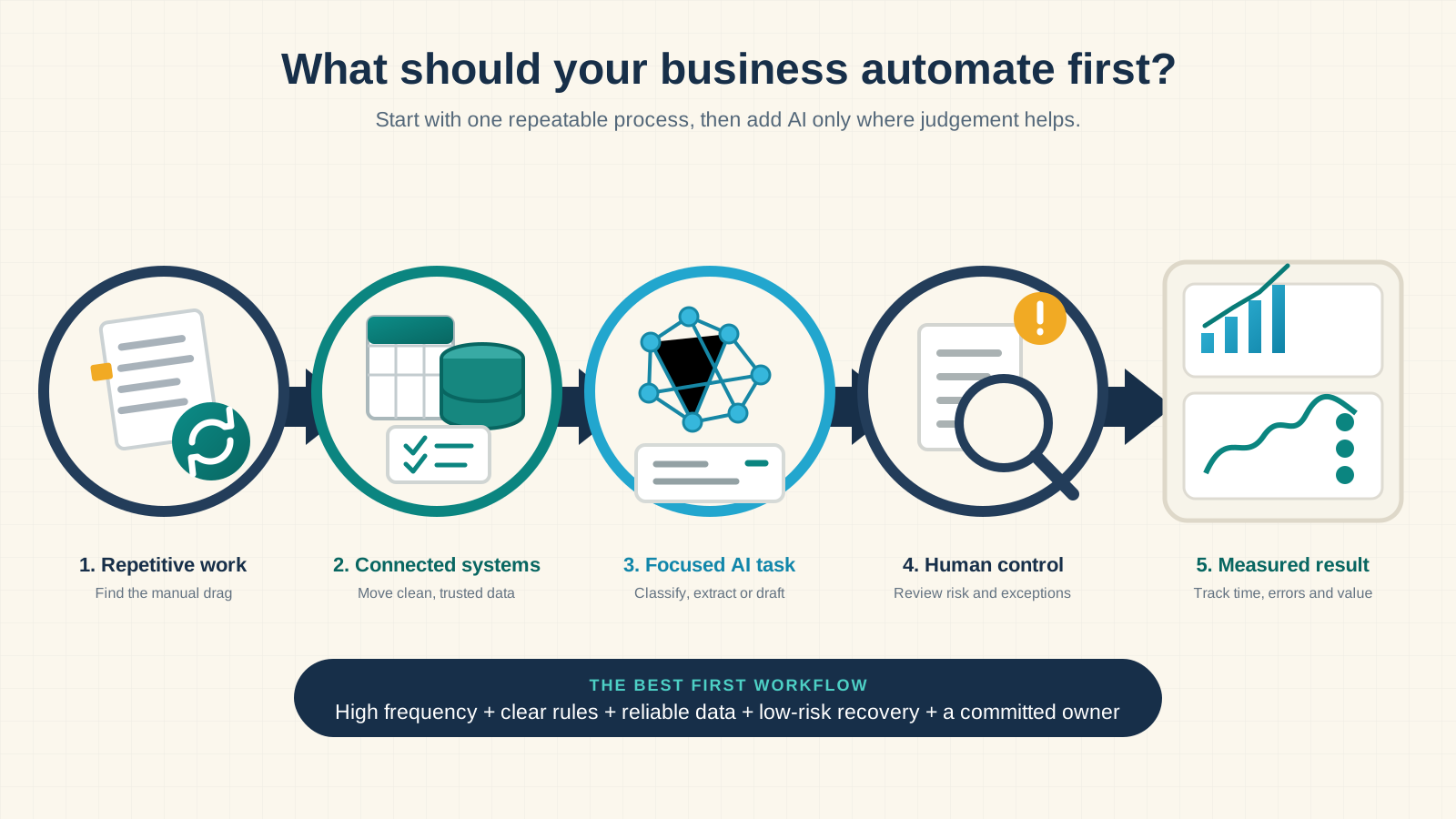
Quick answer: start with one frequent, rules-based process that causes a visible delay or cost, such as lead follow-up, inbox triage, client onboarding, CRM updates or a weekly report. Use fixed rules for every predictable step and AI for one narrow judgement, and keep a named person reviewing anything unusual.
I usually hear about automation when a team is already tired of the work. Leads sit in an inbox until someone notices them. A new client sends the same information twice. Friday's report starts with three spreadsheets and ends with somebody checking totals late in the day. Those frustrations are useful clues, but annoyance alone is not a business case.
What is AI workflow automation?
AI workflow automation connects the tools your business already uses and moves work through a repeatable sequence. An event starts the process, the workflow collects and checks information, rules decide what is allowed, and AI handles one narrow task such as reading a message or drafting a reply. The system then updates a record or asks a person to review.
Take a website enquiry. A controlled workflow checks the contact details, works out which service was asked for, adds the lead to your CRM, drafts a reply, assigns an owner and records each step. A person still handles unusual, sensitive or high-value enquiries. The AI is one step, not the whole workflow.
Manual versus automated: five business tasks side by side
These are the five processes I am asked to automate most often in Nepal and abroad. The right-hand column is what a first version normally does. It is not a promise about your numbers; measure your own baseline before you build.
| Task | How it runs by hand | How it runs automated | Where AI helps, and where it must not |
|---|---|---|---|
| Lead follow-up | Enquiries arrive by form, WhatsApp, Facebook and email; someone copies them into a sheet and replies when they get time | Every enquiry lands in the CRM within a minute with a source, an owner and a drafted first reply | AI reads the free text for service, urgency and location; a person approves any reply that quotes a price |
| Customer enquiry triage | A shared inbox is read, labelled and forwarded by hand, usually by the most senior person available | Each message is classified, summarised and routed to the right queue with a suggested answer | AI suggests the category and the draft; staff approve customer-facing answers until the error rate is known |
| Client onboarding | After a signed agreement, someone sends the intake form, makes folders, creates the project and books a kickoff, in that order, from memory | The signature triggers the whole chain; a missing document creates a reminder, not a silent gap | No AI needed for most of it; rules do the handoffs and a person does the welcome |
| CRM updates and data entry | Details live in forms, email, spreadsheets and the CRM; staff copy between them and fix duplicates later | One system is the source of truth; approved fields sync, conflicts are flagged for review | AI can extract fields from a document or a message; code decides what is written |
| Weekly operations report | Three exports, a pivot table and a late-evening check of the totals | Approved metrics are gathered, missing data is flagged and a draft narrative is ready for review | AI explains a trend in plain words; it never calculates or changes the underlying number |
Rules, AI steps and AI agents are three different things
| Approach | How it works | Best use |
|---|---|---|
| Rule-based automation | Follows fixed if-this-then-that instructions | Reminders, data transfer, calculations, routing on known fields |
| AI-assisted workflow | Uses AI for one controlled step inside fixed boundaries | Classifying, extracting, summarising or drafting |
| AI agent | Chooses tools and decides the next action itself | Variable work where a fixed route is not enough |
Most businesses should begin in the middle row. You gain flexibility where language is messy, and rules still control permissions and business actions. If the process later shows decisions that cannot be written as rules, add a carefully bounded agent. My guide to AI agents versus traditional automation covers that decision.
Seven workflows worth evaluating first
There is no universal winner, but these processes repeatedly create avoidable friction in service businesses and growing teams.
1. Lead capture and follow-up
Often the strongest first project, because delay has a visible commercial cost. Prioritise it when leads arrive through several channels, staff copy details by hand, reply quality varies, or nobody can see which enquiries are still waiting.
2. Customer enquiry triage
A shared inbox becomes expensive when every message must be read, labelled and forwarded by hand. Begin with suggested categories and draft replies, and let people approve customer-facing answers until real results show where the automation is trustworthy.
3. Client onboarding
A signed agreement usually triggers the same chain of tasks. Automating the handoffs makes the experience consistent without removing the human welcome. Missing information should create a reminder or a review task, never a silent failure.
4. Scheduling and no-response follow-up
Booking software handles the calendar, but confirmations, preparation notes, rescheduling and missed appointments still spill across tools. Keep dates and availability deterministic. Use AI only when an unstructured reply has to be understood.
5. CRM updates and repetitive data entry
Decide which system is authoritative, validate approved fields and flag conflicts. Cleaner data improves sales, support, reporting and every later AI project.
6. Proposals, invoices and payment reminders
Use your software's native features first. Build a custom workflow only when information must cross several systems. Amounts, recipients and payment state are checked by code. AI may draft a note, but it never decides what somebody owes.
7. Recurring operational reports
A workflow gathers approved metrics, detects missing data, calculates totals and prepares a narrative for review. Keep source figures separate from generated commentary.
How to choose the first workflow to automate
Make a shortlist from real work, not a software demo. Watch the process, talk to the people doing it, and look at normal and difficult cases. Then score each candidate from one to five on the factors below.
| Factor | Question to ask | A high score means |
|---|---|---|
| Frequency | How often does this process run? | Often enough for small savings to add up |
| Manual effort | How much time goes into checking, copying, correcting and chasing? | The process uses real team time |
| Delay or error cost | What happens when it is late or wrong? | Fixing it protects revenue, delivery or experience |
| Process clarity | Can the team explain the normal steps and the rules? | The route and the result are consistent |
| Data readiness | Are the inputs reliable and the integrations available? | The systems expose usable APIs, webhooks or exports |
| Recoverability | Can a mistake be reviewed, reversed or contained? | Failures do not cause lasting harm |
| Ownership | Who approves the rules and handles exceptions? | A named person cares about the outcome |
Subtract points for high exception rates, sensitive data, irreversible actions, unclear ownership and changing policies. The best first project is rarely the task with the highest raw time cost. It is the one that combines value with a realistic chance of working well.
A worked example with invented numbers. Automating a monthly three-hour report touches 36 hours a year. Automating a six-minute lead task that happens 25 times each workday touches roughly 650 hours of activity a year. Volume changes the arithmetic. Risk and maintenance still matter.
Estimate the value without inventing a return
Start with a baseline your team can defend: runs per month, multiplied by minutes per run, multiplied by the loaded hourly cost, divided by sixty. Add the cost of delays, errors and missed follow-up only when you can estimate them honestly. Then compare that baseline with the build, the subscriptions, model usage, monitoring, maintenance and the human review that remains.
Do not assume the system removes every minute. A good first version handles the routine path and makes the exceptions easier. Measure cycle time, manual touches, error rate, response time, exception rate and cost per completed run before and after launch.
What a reliable AI workflow includes
- Trigger: the exact event that starts the workflow, with a unique identifier.
- Validation: required fields, formats, permissions, duplicate events and stale records are checked first.
- Rules: calculations, allowed actions, routing and access decisions live outside the AI prompt.
- One focused AI step: one narrow task, with structured output that can be checked.
- Human fallback: low-confidence, unusual, sensitive or failed cases go to a visible queue.
- Safe action: protection against duplicate writes, and a state check before sending, publishing or updating.
- Logs and monitoring: what ran, which version, what it attempted and why it stopped.
Give every integration the minimum access it needs. Keep development and production credentials separate. Do not pass a whole customer record to a model when two fields are enough. If you use n8n or the OpenAI API, read their current data and security documentation before go-live.
What should not be automated first
- A process nobody performs or explains the same way twice.
- Rare work with little cost, delay or learning value.
- Legal, financial, hiring or safety decisions without accountable review.
- Unrestricted payments, deletions, publishing or permission changes.
- A workflow built on incomplete, duplicated or disputed data.
- Customer communication that has not been tested against real examples.
- A giant project described as "automate the whole business".
"Not ready yet" is a useful result. Fixing ownership, data or process clarity often creates more value than forcing AI into unstable work.
From idea to production in six steps
- Observe and baseline. Document the trigger, inputs, decisions, systems, outputs, exceptions, current time and current failure rate, including the workarounds nobody wrote down.
- Define the smallest useful version. One trigger, one normal path, one measurable outcome, explicit exclusions.
- Prototype with restricted access. Test data only, with validation, duplicate protection, failure routes and a kill switch before any real action.
- Run in shadow mode. The workflow records what it would do without doing it, and you compare it with human decisions on real examples.
- Move to approval mode. The workflow prepares the work and a named person approves, edits or rejects it. Record the reasons for overrides.
- Automate only the proven path. Low-risk cases run on their own, exceptions stay behind review, and the workflow is retested whenever a tool, prompt, model or policy changes.
What AI workflow automation costs in Nepal
I publish my prices in USD and show NPR beside them at Nepal Rastra Bank's rate, so a business in Kathmandu and a client abroad read the same list. Tool subscriptions and model usage are paid in your own name and are separate from my fee. Nothing is quoted on request.
| Stage | What you get | Price |
|---|---|---|
| Discovery and audit | One process mapped, scored on the seven factors above, with a written 30 day plan and a build recommendation your own developer can follow | USD 249 (about NPR 34,000) |
| Growth sprint | Four weeks to build and test one defined workflow through shadow and approval mode, where the scope fits a sprint | USD 899 (about NPR 122,000) |
| Retainer with automation | Ongoing operation, monitoring and the next workflows, reported from your own accounts, rolling monthly with thirty days notice | USD 1,800 a month (about NPR 245,000) |
What each tier leaves out is on the pricing page. For how I run these builds and what I will not automate, read the AI automation expert in Nepal page, and the AI automation and n8n service page for the engagement scope.
What happens in a discovery call
A useful discovery call is not a pitch to add AI everywhere. We take one repetitive process and work through its volume, delays, systems, data, rules, exceptions, permissions and owner. Then we decide whether existing software, a normal integration, an AI-assisted workflow or custom development is the sensible next step.
Bring a rough monthly volume, the tools involved and a few examples of normal and unusual cases. You do not need a technical specification. If the process is not ready to automate, I will say so. The first thirty minutes are free: book a consultation.
Start with one measurable workflow
AI workflow automation creates value when it is attached to a real operational problem. Choose a repetitive process, define its trigger and outcome, keep the rules deterministic, use AI only where language judgement helps, and make exceptions visible to a person. The first win teaches your team how automation behaves in the real business. Then you expand with evidence instead of optimism.
Key takeaways
- Start with frequency, clarity, data quality, recoverability, and ownership.
- Use rules for predictable work and AI for narrow language tasks.
- Compare total operating cost with measured time, errors, and delays.
- Test in shadow and approval modes before allowing business actions.
- Keep a person responsible for exceptions and sensitive decisions.
Questions people ask before automating a workflow
Straight answers to the questions business owners ask before automating a workflow.
What is AI workflow automation?
AI workflow automation connects your business tools and moves work through a repeatable process. Rules handle the predictable steps, and AI performs one narrow task such as classifying a message, extracting data from a document, summarising a call or drafting a reply. A person still reviews anything unusual or sensitive.
What business process should I automate first?
Start with a frequent, rules-based process that uses reliable data, creates a measurable delay or cost, and can recover safely from a mistake. Lead routing, inbox triage, client onboarding, CRM updates, document intake and recurring reports are the usual first candidates.
How much does AI workflow automation cost in Nepal?
With me, discovery and a 30 day plan cost USD 249 (about NPR 34,000), a four week build of one workflow costs USD 899 (about NPR 122,000), and ongoing operation is USD 1,800 a month (about NPR 245,000). Subscriptions and model usage are paid in your own name on top. Details are on the pricing page.
Can AI automate a customer service workflow?
Yes, in stages. First the workflow classifies and routes each message and drafts a reply for a person to approve. Once the drafts are right often enough, routine answers go out on their own and anything about money, complaints or a named person stays with a human. Starting fully automatic is how businesses lose customers.
How do I automate a business workflow without a developer?
For simple cases, tools such as n8n, Zapier and Make connect common apps with rules and no code. The limit is reached when data has to be validated, duplicates prevented or an AI step checked. At that point you need someone who can write the rules and the tests, which is the part I do.
Is AI workflow automation worth it for a small business?
Yes, when a small team repeats the same process often enough for the arithmetic above to work. One focused workflow can improve response time and consistency without becoming an expensive company-wide project. If the process runs a few times a month, fix it by hand and spend the money elsewhere.
Which workflow should you automate first?
Book a free 20-minute discovery call. We will map one repetitive process and decide whether rules, integrations, AI, or custom software are the right fit.